In Android 6.0 Marshmallow become ubiquitous before, let us look at what it all nice feature that contains these features will make your life easier.
1, Check the battery level

If you always worry about the phone's battery will be consumed before charging it with Android 6.0, you do not need to worry about. Android 6.0 Marshmallow able to provide a new range of battery statistics give you information about the remaining capacity of more accurate description, including how long it takes to be able to 100% charge, and how long you can use the remaining battery time.
Go to Settings> battery, you can view statistics.
2, Extends battery life by 30%

If your battery is about to run out, then you can try to use this shortcut, the new Android Marshmallow function to extend the battery life by 30%.
You want to activate a longer battery life, you need to activate the power saving mode. Go to Settings> Battery, click the menu to open it. This way, when your phone is idle time, then it will enter the "deep sleep", the background application will reduce activities.
3, Rapid access to relevant information by tapping the Home key

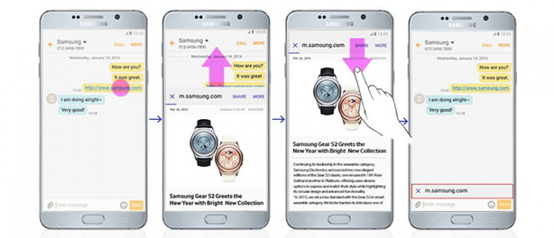
When you're in a conversation among some of the information they need to quickly find the time, you have to choose between instant messaging applications and browser switch, very annoying. For example, when you are with friends send a message similar to the cinema to discuss things, maybe you need to keep between mail and browser to view the video details handover, very troublesome.
Android 6.0 Marshmallow is Now on Tap function will help you solve this puzzle, it will be based on your understanding of the text, to provide relevant information and links for you. Now on Tap want to get information, you simply click and hold the Home button, and it will pop up with information related to your session.
4, Application permissions have more control
In Android 6.0 Marshmallow, Google added a new feature that allows users assigned specific permissions for the application, the benefits of doing so is to allow users to better protect their privacy. In Marshmallow, the application will be needed to obtain a permission request, the user can choose whether to give it permission to do so. For example, when you first want to take a picture within the WhatsApp application time, WhatsApp will require access to your camera.
Meanwhile, Marshmallow also allows you to easily undo a single authority, which means that before you can easily revoke permission given to an application. You want to delete or add application permissions, you can go to Settings> Applications> Select application> Permissions> add or remove permissions.
5, The backup unlimited number of pictures

Google Photos app for the latest update allows users to back up and store an unlimited amount of photos. Enter backup and synchronization> Backup to open, Photos application also has a free editing tool.
6, Improved copy and paste functions
Google draws some inspiration from Apple in the Android 6.0 Marshmallow, the increase for the new copy and paste functionality. When you highlight a portion of text, cut, copy, and share options will appear in this part of the text above, rather than at the top of the screen.
7, In a safe place automatically unlock
If you always need to enter a password to unlock the phone annoyed, especially when you're alone at home, then this feature will be very suitable for you. In Android 6.0, you will be able to tell your phone what you trust position, as long as you are in the position of the body, you do not need to use a password or unlock pattern to open the phone.
Want to turn on this feature, you can go to Settings> Security> Smart Lock> Trusted sites, you can also set a credible and trusted voice equipment.
8, Did not unlock the phone for voice search

Has a voice search button on your Android 6.0 lock screen, tap the microphone icon, you can ask your Android phone to call a friend to find something or write information. Also, when you encounter translation problems, you can quickly tap the microphone icon and ask Google translate for you.
9, Forget where your phone? Google it
I can not remember where to put your phone yet? You can be a desktop, tablet or laptop in the Google search for "find my phone" and it will tell you where the phone.
Want to activate this feature, you need an Android Device Manager, you can find online and download the application. In the Manager, you will need to add a Google Account to your phone (if your phone is stolen confirm, then you can also set the phone to lock and erase data therein), and then in the Android Device Manager On "View device location" option.
10, Access your phone via a friend's mobile phone
If you forget where your phone is lost, you can still access your phone to the message through a friend's Android phone, photos and other information, just as a "guest user" Log on to. Of course, before that, you need to add this to a friend can share your device list.
Related Articles:
Recover Lost Data from Sony after Android 6.0 Update